
ZeroBounce
Email VerificationVerifies email lists and provides tools for monitoring deliverability.
Useful when list cleaning and sender health belong in one workflow.
Explore ZeroBounce (opens in a new tab)
Read emails from pages you choose. Review the results, then copy or download them.
Paste text or upload a supported file. Click Extract emails, then review your results.
Enter public URLs and choose whether to follow important links. Allow downloading, then click Load webpages. Click Extract emails after loading.
Download and unzip the extension, then load its folder in Chrome or Edge. Open a webpage and click Read this page. Review saved emails, then copy or download them.
Article content and detailed guides remain in English. The selected language applies to controls and quick instructions.
Language is saved on this device. Email addresses, URLs and filenames are never translated.
Load public webpages, then extract email addresses from their content. Loading pages and extracting emails are two separate steps.
Start with the URLs you enter, then look for useful pages on the same website, such as Contact, About and Team. Loads up to 25 pages per website. They respect website crawl restrictions and may finish with fewer pages. Starting a new load replaces previously loaded pages; download results you need to keep first.
On this hosted website, public URLs go to our server for loading. Text and files stay in your browser. Do not enter passwords, private tokens or confidential URLs. JavaScript reading runs a browser on the server; nothing is installed on your computer.
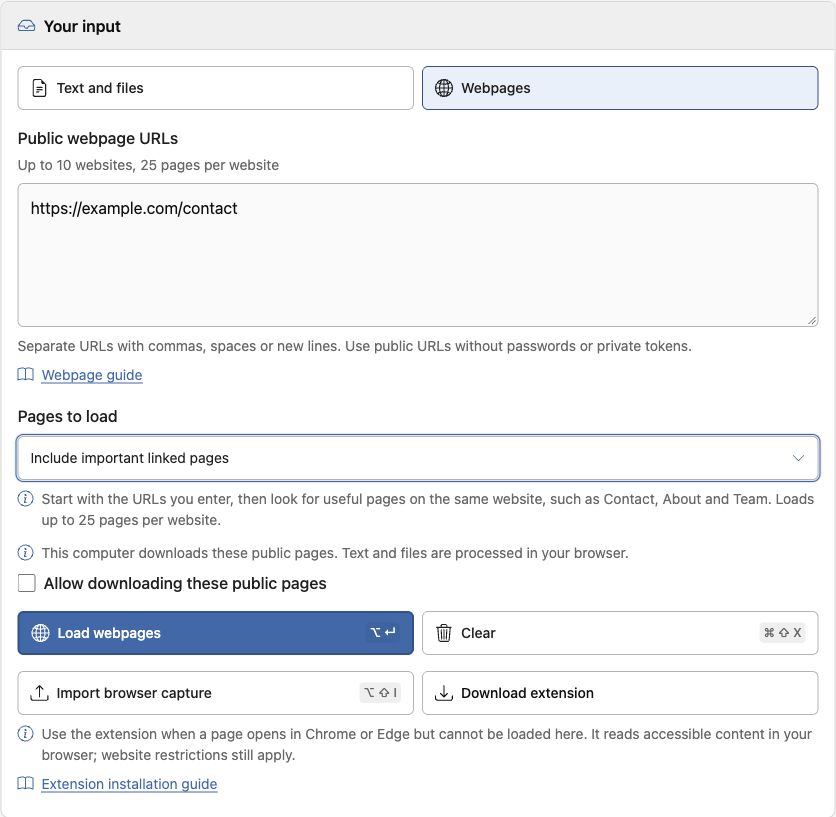
A loaded page can contain no email addresses. Failed pages do not erase successfully loaded pages. Use Cancel loading to stop an unfinished load. Clear resets URLs, loading options, permission and webpage results; History remains.
See the results guide for filters, downloads and History.
Use it for a page you can open in Chrome or Edge, including signed-in content or a page the server cannot load. Open the page and complete any sign-in or verification yourself. The extension extracts addresses from content it can access in your browser.
The extension can also copy and download emails on its own. Importing is only needed to bring those emails into the main extractor. It adds source pages and replaces an existing entry with the same URL; it does not import the original webpage. It cannot guarantee access to hidden, unloaded or restricted content.
Captures from private URLs, URLs containing tokens or credentials, or nonstandard ports cannot be imported into Webpages. Choose Download CSV in the extension, then Upload files in Text and files instead.
Check address validity before using your list.
Verifies email lists and provides tools for monitoring deliverability.
Useful when list cleaning and sender health belong in one workflow.
Explore ZeroBounce (opens in a new tab)Provides email verification for uploaded lists and connected workflows.
Useful for reviewing contact lists before a campaign.
Explore Bouncer (opens in a new tab)Provides email verification and tools for improving lead data quality.
Explore Clearout (opens in a new tab)Send newsletters and campaigns to people who opted in.
Create newsletters with publishing and audience growth tools.
Useful for publishers building a newsletter business.
Visit beehiiv (opens in a new tab)Add forms, landing pages and booking tools for new enquiries.
Create landing pages for campaigns and lead capture.
Useful when campaigns need dedicated enquiry pages.
Visit Unbounce (opens in a new tab)Build one-page sites with contact and signup forms on Pro plans.
Useful for a small landing page centered on one enquiry action.
Visit Carrd (opens in a new tab)